
Category: Guides
-
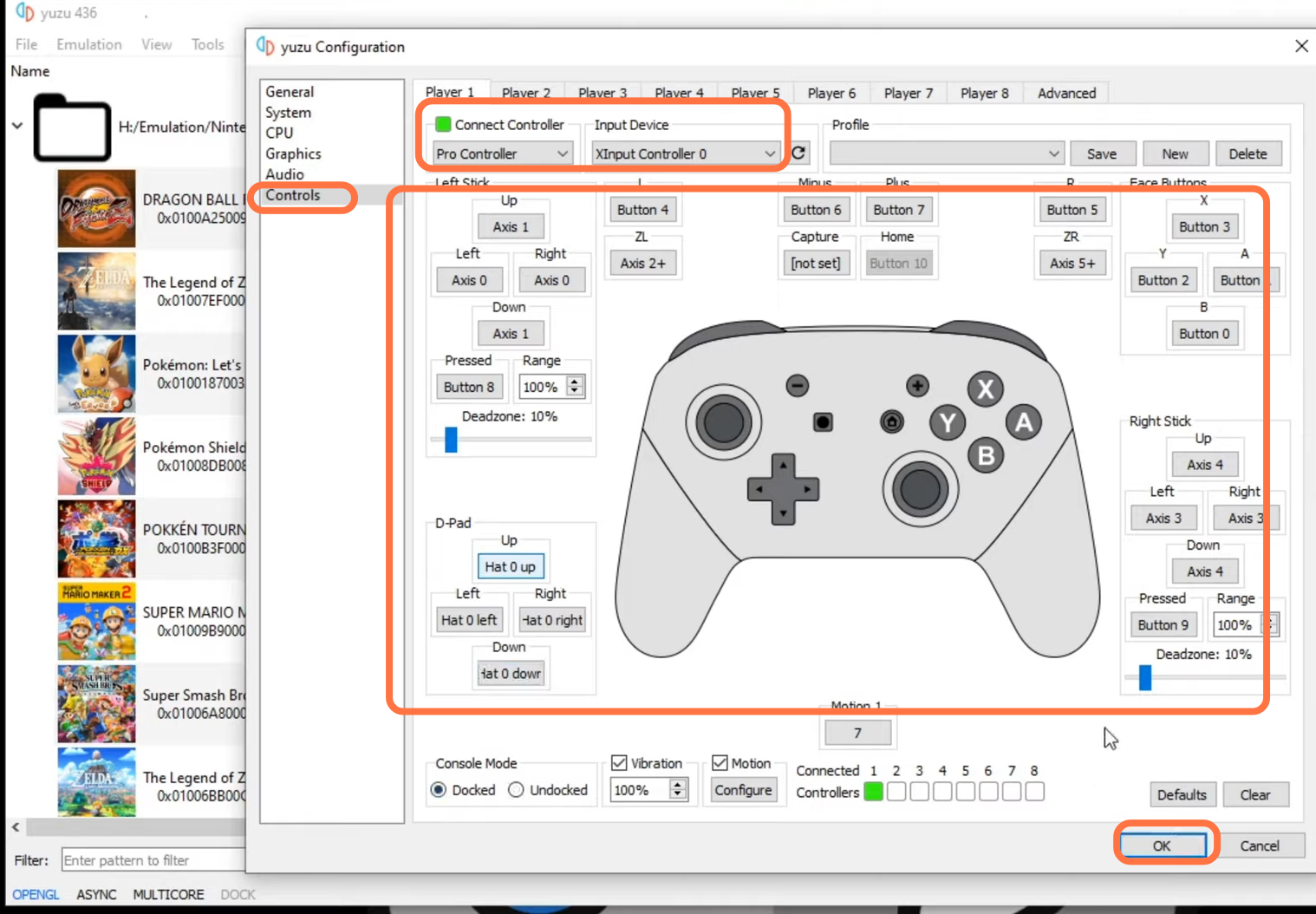
How to Play Pokemon Scarlet and Violet on PC Yuzu Emulator
This guide will tell you how to play Pokemon Scarlet and Violet on PC | Yuzu Emulator. 1- The first thing you have to do is open up the following link https://yuzu-emu.org/ and it will take you to the main page of the official Yuzu. Click on the Download button on the main page and…
-

Civilization VI: How to Save Game
Civilization VI is a strategy game that takes players on an epic journey across the millennia. Players start as a small tribe of people and work their way up to build a civilization that will stand the test of time. It is available on Microsoft Windows, macOS, Linux, iOS, Nintendo Switch, PlayStation 4, Xbox One,…
-

How to Switch to Game Chat or Private Chat in WARZONE 2
In this guide, you will find how to Switch to GAME CHAT or Private Chat in WARZONE 2. The first thing you will need to do is boot up your game, press the options button, and then click on channels using the R1 button. Under this, you will find the game channels and your channels.…
-

How to Change the HUD SIZE in Minecraft Bedrock
This guide will let you know how to change the HUD SIZE in Minecraft Bedrock (GUI Scaler). GO through the guide and follow the step-by-step instructions below to do so. Turn on your PlayStation 5 console and ensure that it is functioning properly. On your PlayStation 5 controller, press the “Options” button. Move the cursor…
-

New Material Duplication Glitch Lego Fortnite
In this guide, you will learn a glitch to get unlimited materials and duplicate items effortlessly in Lego Fortnite using the easiest way. First, collect various materials you want to duplicate, such as obsidian slabs, copper bars, bright core, and other items like iron bars or frost pine. Go outside your base area. It’s important…
-

Roblox Clicker Madness Cheat Codes
Clicker Madness is a very popular Roblox game in which the players will need to become powerful by upgrading their stats. You can use rebirth to unlock amazing islands and unlock new pets with the help of gems. Beat other players all around the globe in PVP battles and make your way to the game’s…
-

Roblox Build a Boat Codes 2023 (Updated)
In Build A Boat, the main objective of the player is to reach the end of the map by using a boat and collect all the treasures in the game. You have to build the boat by yourself. You can make a team; they will help you out. Along with this, you also have to…
-

How to Get Free Custom Room Card in Free Fire
This guide will provide you a method to get free Custom Room Cards in Free Fire. Go through the guide and follow the steps to get them. The first thing you have to do is get two guilds. For the first guild, you have to transfer the ownership to your second account of the game…
-

The Elder Scrolls V Skyrim – PS4 Save Game
The Elder Scrolls V Skyrim is an Open world game developed by Bethesda Game Studios. Players in the game have the option of developing their character. They can increase their skills by using them in-game and reading books that may be purchased or acquired on corpses. Players can join groups and fight opponents like dragons,…
-

How to Change Your Horse to the LYNX – AC Valhalla
This guide will let you know how to change your Horse to the LYNX in Assassin’s Creed Valhalla. You have to follow the simple steps in this guide to do so. First, you need to go to the stable, and if you don’t know where the stable is, you have to open the map and…
-

How to Make an OP Shield Bash Build in Skyrim
This guide will explain how to make an OP shield bash build in Skyrim. This article includes multiple web stories to help you make the best OP build. How to Make an OP Shield Bash Build in Skyrim – Part 1 How to Make an OP Shield Bash Build in Skyrim – Part 2 How…
-

How to Upgrade Marvel Avengers PS4 to PS5
This guide will tell you how to Upgrade Marvel Avengers PS4 to PS5. Go through the guide and follow all the instructions carefully to upgrade it. 1- First, you have to put your game disc into PS5 and the game page will pop up in front of you. On the game page, you will find…
-

How to Fill All 4 Soul Spheres – Roblox Zombie Uprising
This guide will let you know how to fill all four soul spheres in Zombie Uprising. The first thing you will need to find is a statue holding a ball. Make sure it is filled enough. If the statue is not fully charged, there will be a text above the statue. And wait till night…
-

Horseman Challenge – Ride From Valentine to Rhodes in 5 Minutes
You will need to complete Chapter 1 as a prerequisite, and the reward is “Horseman Holster available at any trapper”. This guide will let you know how to complete the Horseman 3 challenge in Red Dead Redemption 2. To complete this challenge, you can use the horse you get during the game’s first mission. To…
-

Ghostwire Tokyo: How to Save Game
Ghostwire: Tokyo is a competitive first-person shooter where players must cooperate to survive and take down the nefarious occultist behind an ever-growing supernatural force that threatens humanity. Ghostwire: Tokyo gives you a feature to ally with powerful spectral entities on their quest. Ghostwire: Tokyo offers players the convenience of an auto-save feature that consistently saves progress,…
-

How to Fly Elytra In Minecraft PE
In this guide, you will learn how to fly Elytra In Minecraft PE. You will need to go to a higher location to fly Elytra. To fly Elytra, you will first need a firework rocket. You can make it by putting the gunpowder, and paper in a crafting table, as shown in the image below. …
-

How to Show or Use Emotes in GTA 5
This guide will tell you how to show or use emotes in GTA 5. Go through the guide and follow the simple steps to do so. First, you have to boot up your game and then if you are playing the game on a PC, you need to press the M button on your keyboard…
-

How to Install Optifine Shaders and Texture Packs on Steam Deck
This guide will let you know how to install Optifine shaders and texture packs on Steam Deck. You must follow each step mentioned in the guide to accomplish the task. Installing shader In this section, we will take you through the steps to install a shader in desktop mode. By following the steps below, you…
-

Roblox Vehicle Tycoon Codes 2023 (Updated)
Vehicle Tycoon is a Roblox game in which you can collect over 45 cars. You have to build up your dream car dealership and explore. Drive cars to buy more awesome cars and upgrade your car dealership. You can also race against other people in this game. Vehicle Tycoon Codes: The codes in the Vehicle…
-

Best Minecraft Mage, Wizard & Witch Skins to Try Out
If you’re a fan of the video game Minecraft, then you probably noticed that there are some skins available for this game. This guide will provide you with the best Minecraft Mage, Wizard & Witch Skins to try out. Earthen Enchanter This skin is perfect for anyone who wants to add a touch of magic…