
Category: Guides
-

Roblox Baby Simulator Codes 2023 (Updated)
In the Baby Simulator game, you will become a baby and play with a wide range of toys. You have to explore different areas and earn happiness and coins. This will increase your baby power. The Baby Simulator game Roblox game gives you the feature to compete in the Baby Rumble where you can win…
-

Roblox Smacking Simulator Codes 2023 (Updated)
In the Smacking Simulator game, you can fight with your friends or other players all around the world. Beat them and find your way up to the clouds. Discover some new islands and get new pets, these pets will help you out in your journey. You will get a surprise after reaching on the clouds. …
-

How to Enlarge Items & Objects – Sims 4
In this guide, you will learn how to enlarge the items and objects in Sims 4. Follow the steps carefully to enlarge any item in Sims 4. Step 1 The first thing you will need to do is choose an item and place it somewhere. Then press “shift+[” to enlarge the chosen item. Step 2…
-
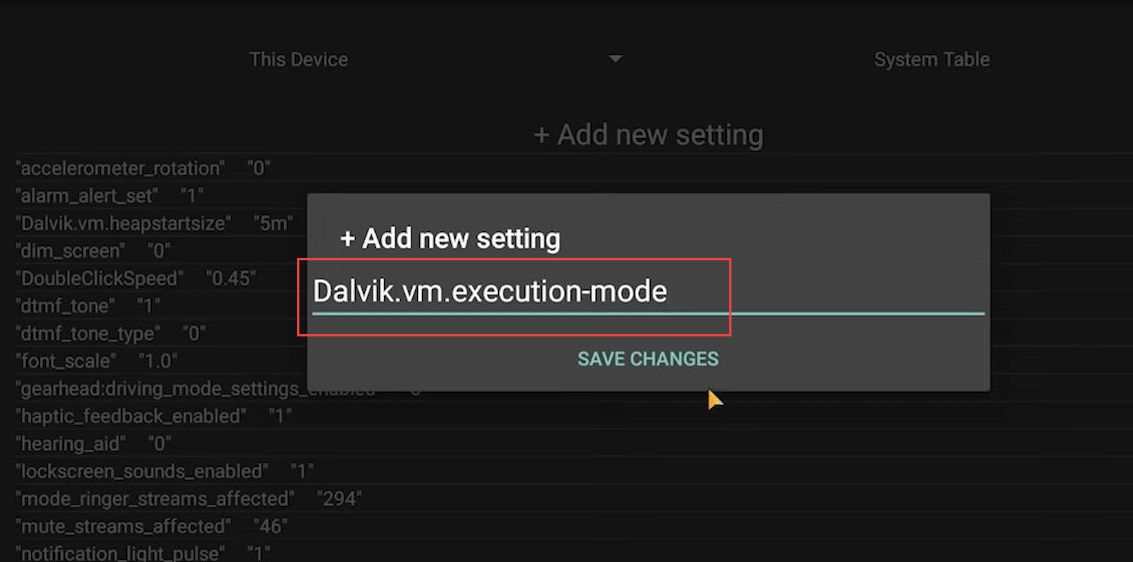
Top 5 SetEdit Commands For 100% Headshot Rate – Free Fire
This guide will let you know how to increase the headshot rate for your game by adding different commands to the SetEdit application. Open the SetEdit application on your device. Click the Add new settings option and write ”DoubleClickSpeed”. Now click the Save Changes button, set the value for this command to ”0.45′‘ and click…
-

Soul Knight Codes 2023 (Updated)
Soul Knight is an action game that was released in 2017 for the game players all around the world. The game is based in the dungeons world and the players need to explore the dungeons in order to find out the stolen magical stone. You will also find many weapons there that will help you…
-

How to Join Guild in Dota 2
This guide will let you know how to Join Guild in Dota 2. All players can join the guild in Dota 2 to socialize and access rewards. You can also join a guild to play up and rank up with other players. You have to go to the main screen and click on the Banner…
-

How to Reset PS5 Network Settings
This guide is about how to reset PS5 Network Settings. You have to go to the settings option, then scroll down to the System. Click on it and it will take you to the System Software. Go to the Reset option and select this. Then you need to tap on Restore Default settings and enter…
-

How to Start Taxi Work in GTA Online Drug Wars DLC
In this guide, you will find how to start Taxi Work in Grand Theft Auto Online Drug Wars DLC. Go through the guide and follow the simple steps to start it. Now you can now become a legal taxi driver in Grand Theft Auto Online. You cannot purchase our very own taxi, so you have…
-

Roblox Workout Island Codes 2023 (Updated)
Workout Island is a roblox game in which you will need to increase your strength, weight and DNA by working out. Lift weights and become the strongest person on the island. Dominate the island with your strength. You can sell your strength in order to upgrade the body and DNA. Active Codes CODES REWARDS BuffNoobJr…
-

How to Install DualSense – PS5 Icons Mod in Starfield
“DualSense – PS5 Icons” improves the game experience by replacing the Xbox icons with PlayStation icons, which is perfect for DualSense controller users. By ensuring that on-screen icons match those on your PlayStation controller, it offers a quick but effective way to customise your gameplay. To install the DualSense – PS5 Icons mod in Starfield,…
-

How to Fix PS5 Error Code CE-109601-7
If you are facing PS5 error code ce-109601-7, then you have come to the right place. This guide will show you how to get rid of this error. There are multiple fixes that you can try to fix the error. Check for Update In this section, we will take you through the steps to download…
-

Ways to Earn Money – Westbound (Roblox)
In this guide, we will tell you about different ways to earn money in the westbound. There are ways for cowboys and outlaws to get the money. Earning money for outlaws: First we will show you the ways to get money as an outlaw. Rob Stores: You can rob the general stores. Outlaws can…
-

Tsuki Adventure Forest Guide
This brief guide will get to know some tips and tricks about Jugafuchi Forest in the TSUKI adventure. This place is one of the essential places which trigger many diary entries. You can see the ranger jovian. He rescues people who are lost in the woods e.g. Shawn the deer. Tsuki will be doing lots…
-

Where To Find Bullhead In Assassin’s Creed Valhalla
In this guide, you will get to know how and where to find the Bullhead in the Assassin’s Creed Valhalla. You have to follow the steps in this guide to get the bullhead fish. You need bullhead fishes to make a shrine. All you need to do is go to the marked location on the…
-

How to Repair Your Train in Voidtrain
It will be a short discussion about repairing your train in the game, Voidtrain. For this purpose, you must switch to your hammer by holding T. Usually, the hammer is used to repair different things. Anything that shows less than 100% can be repaired. It would be best if you pressed the left button of…
-

How to Enable Flight on a Minecraft Server
This guide will walk you through the steps to enable flight on your Minecraft server, ensuring you can explore your world freely without facing unexpected interruptions or being kicked out. Step 1: Disconnect from Your Server Begin by disconnecting from your Minecraft server then access its main directory. Step 2: Locate the Server’s Main Directory…
-

Roblox Anime Defense Simulator Script
In this guide, you’ll find all the available scripts for the Roblox Anime Defense Simulator game along with the procedure of executing the scripts using the Roblox script executor. Additionally, you’ll find out about the perks that you’ll be getting by using these scripts. Anime Defense Simulator Anime Defense Simulator is an engaging Roblox game…
-

Best Plugins to Use in Arcadegeddon
In this guide, you will find all the Best Plugins to use in Arcadegeddon. Basically, plugins are the buffs that you can unlock and upgrade. They are the abilities in form of explosions when you land or might be a simple buff such as extra health and shield. First, you will need open the game…
-

How to Change Controls & Button Settings in Rumbleverse
In this guide, you will find how to change controls & button settings in Rumbleverse on PS5, Xbox, and PC. It will provide you with the fastest method to do so. On the home screen of Rumbleverse, you will need to press options on the upper right side of the screen and go to the…
-
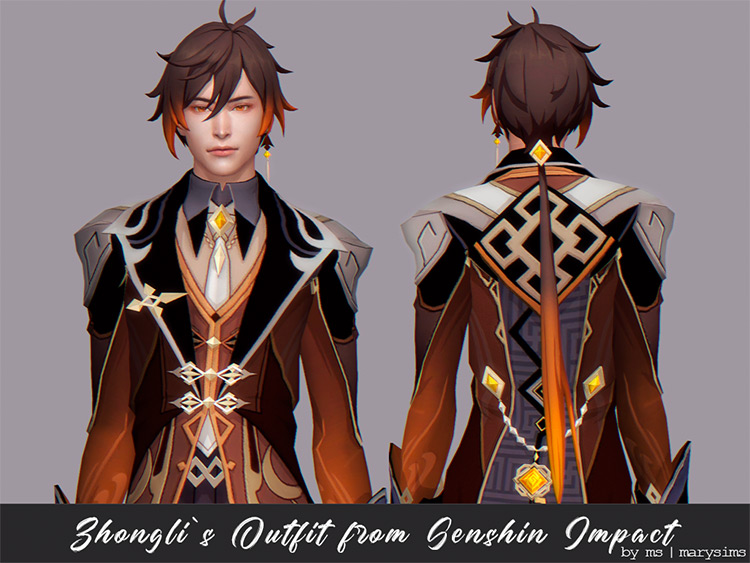
How to Appear Offline on Genshin Impact
Genshin Impact is an action role-playing game that was released in 2020. The game is set in an open-world environment that lets the players obtain new characters and weapons. You will need to take control of one of four interchangeable characters in a party and you can switch the character anytime during the fight. All…