
Category: Guides
-

How to Beat Experiment No. Z-57 Boss – Metroid Dread
This guide will let you know how to beat the EXPERIMENT NO. Z-57 BOSS in Metroid Dread. Once you get into the battle, you have to be right on your toes right away because he does have a set number of attacks, and it’s randomized, so you have to see and make a count of…
-

How to Get Free Cars in Gran Turismo 7
This guide will let you know how to get free cars in Gran Turismo 7. The first thing you will need to do is go to GT cafe to find the setup races there. After finishing the third or above race, you will get a gift card as a reward. You have to run through…
-

Best Weapons to Use in Arcadegeddon
This guide will let you know which are the Best Weapons to use in Arcadegeddon. Every weapon in Arcadegeddon has there own pros and cons and all of them are different from each other. It depends on you which weapon suits your target, as different weapons have different purposes. The weapons are divided into two…
-

Where is The Ramp Buggy Stored in GTA 5 ONLINE
This guide will show you where is the Ramp Buggy stored in Grand Theft Auto 5 ONLINE. You will need to go to the office and your computer. Navigate to your desktop, load it up and go to Vehicle Cargo. You have to buy a vehicle warehouse. After that, tap on warehouse map, click on…
-

How to Install Astralities’ Fantasy Skintone Expansion Mod in Baldurs Gate 3
“Astralities’ Fantasy Skintone Expansion” mod expands the selection of fantasy skin tones available in Baldur’s Gate 3. It includes whole new color possibilities inspired by jewels, D&D entities, semi-natural themes, and neutral colors. With the help of this mod, players can create more varied and distinctive characters in-game. To install the Astralities’ Fantasy Skintone Expansion…
-
Biomes O’Plenty Mod: How To Download And Install In Minecraft
BIOMES O’PLENTY MOD is basically a biome mod which brings some unique and new biomes into the Minecraft game. This mod also adds flowers, pots, building blocks, trees and more. Follow the following steps to install BIOMES O’PLENTY MOD 1.16.4 in Minecraft: The first thing you will need to do is to open the website…
-

How To Change Your Name – Among Us Airship Update
This guide will let you know how you can change your name in the Among Us. You have to follow the steps in this guide, and you will be able to do it. After the Among Us Airship update, there are some bugs and errors in the game, and you can’t change your name in…
-

How to Get Rich In Dinkum
This guide will let you know how to get RICH in Dinkum. First, you have to go to your tent and talk to Fletch and get certain licenses by using blue tickets in the upper right corner. The second step is to invite John to the island, the first building you get in the game…
-

How to Invite, Add Friends and Play Multiplayer with Friends in Battle Run Multiplayer
In this guide, you will find out how to Invite, Add Friends and Play Multiplayer with Friends in Battle Run Multiplayer. First, you have to boot up your game and then click on the Add Friend button on the home screen. It will bring you to the Add Friend page, then enter the code of…
-

Car Detailing Simulator – Controls Guide
In-Car Detailing Simulator, you get a chance to start your adventure by running a detailing business. The goal is to promote car restoration among gamers and help them create the experience of running their own detailing business. In this guide, you’ll find all the Controls to play Car Detailing Simulator. Action Keys Description Forward W…
-

Tomboy CAS (Clothes + Hair): Sims 4 CC (List)
If you’re looking for Tomboy clothes and hair for your Sims, then you need to check out the following list. Destroyed Boyfriend Jeans Destroyed Boyfriend Jeans are perfect for Sims 4 who are looking for something exciting and new. These jeans come with a distressed look, giving them a unique and exciting look. Tsminh`s Lee…
-

Best Minecraft Genshin Impact Skins to Try Out
If you’re a fan of the video game Minecraft, then you probably noticed that there are some skins available for this game. This guide will provide you with the best Genshin Impact Skins to try out. Xiangling This skin is perfect for fans of the popular game and brings the excitement of Genshin Impact to…
-

How to Get the Climbing Axe – The Forest
In this guide, you will get to know how to get the Climbing Axe in The Forest. You have to follow the steps explained in the guide to get the climbing axe in the game. You can get the Climbing Axe very easily and quickly in The Forest. Open your map and go to the…
-

GTA Online – All Shipwreck Treasure Locations
This guide will provide you with all the Shipwreck treasure locations in GTA Online. You will also learn how to unlock the Frontier Outfit. Chest #1 Here is the location of the first chest on the map. Chest #2 You will find the second chest right at this location as shown in the image below. …
-
How to Fix PS5 Rest Mode
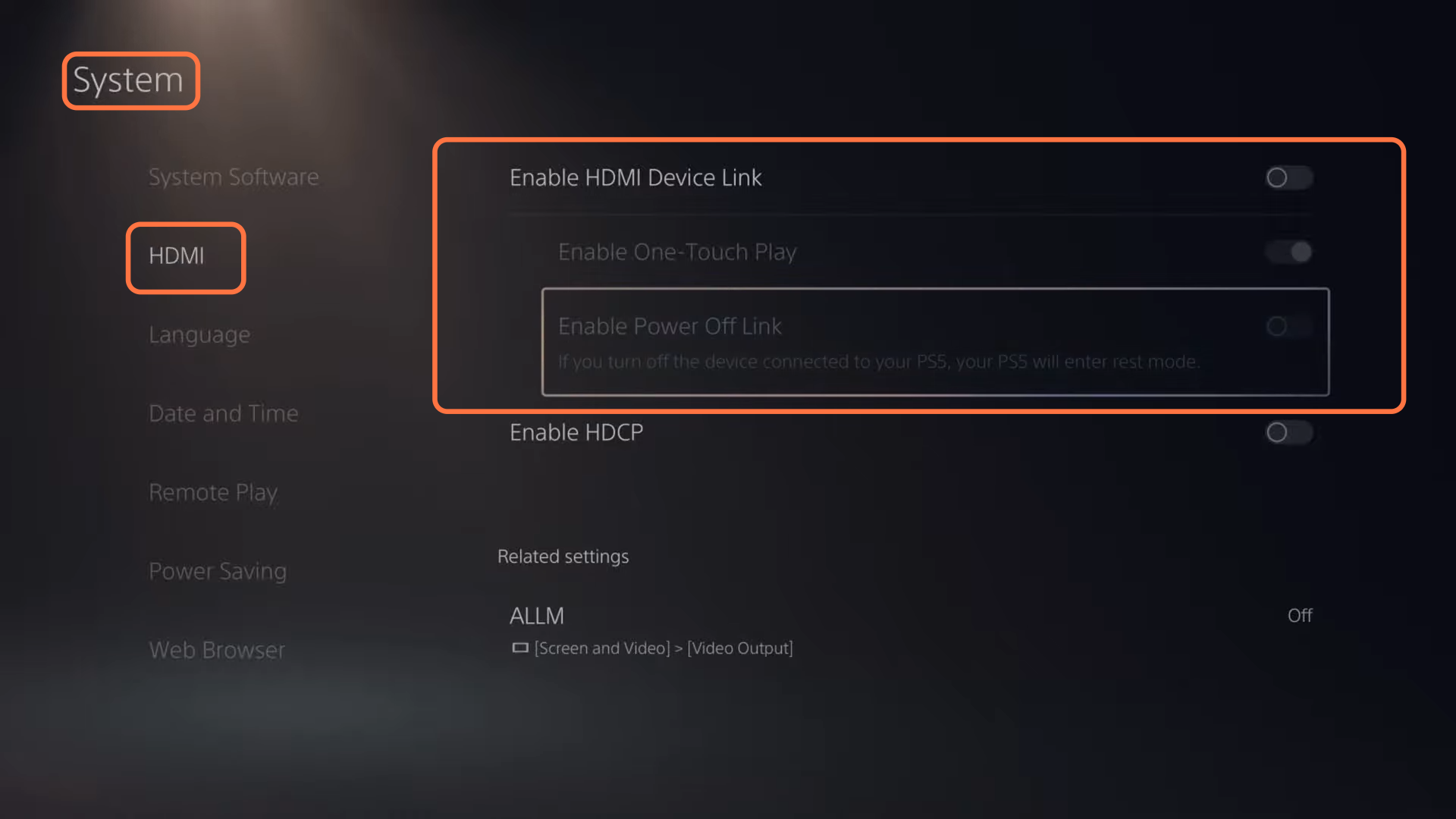
This guide will tell you how to fix PS5 Rest Mode Turned Off Improperly. 1- First, go to the home screen of your PlayStation, and click on the settings button on the right side of your screen. Then select System, select HDMI from the left side and go to the HDMI device link and turn…
-

How to find Submerged Ruins, Buildings, Drowned ships and Crashed Freighters in No Man’s Sky
Alongside submerged ruins, there are three other interests you can find underwater those being crashed/drowned ships, crashed freighters, and sunken buildings. So there’s a total of four interests you can find underwater. This guide will let you know how to both find and access all four of these points of interest starting with submerged ruins.…
-

How to Unlock CHARLIE NEW MISSIONS & Get Started in GTA Online San Andreas Mercenaries
This guide will help you to unlock Charlie’s new missions and get started in GTA Online San Andreas Mercenaries. You will receive a phone call in-game from a character named Charlie during gameplay. After the call from Charlie, you’ll notice the letter C marked on your map. Despite the presence of the C marker on…
-

How To Make Brown Leather Pants
Brown Leather Pants is a type of safety armor that covers and protects the lower body of the player. To make Brown Leather Pants, you’ll need Cow or Horse Leather, Leather Pants and Cocoa Beans. Please follow the following steps to make Brown Leather Pants. Cow or Horse Leather In order to make leather pants,…
-

Where to find the Creature Decoy in Subnautica
In this guide, you will come to know where to find the Creature Decoy in Subnautica. Go through the guide and follow the step-by-step instructions to find it. Starting from the coral tube sticking up out of the water, you will need to make your way about one bump to the left of the north…
-

Free Fire Max Mic and Sound Problem (Fixed)
This guide will tell you how to fix the mic and sound problem in Free Fire Max. There are multiple reasons for this problem. If you bought a new phone, then there might be a microphone glitch or bug in it. So you have to go to the settings of your mobile and check for…