
Category: Guides
-

How to Get The Key Card in Hello Neighbor Alpha 4
This guide will let you know how to get the Key Card in Hello Neighbor Alpha 4. Go through the guide and follow the step-by-step instructions to get it. Step 1 The first thing you will need to do is go into the house, get behind the grid, and attract the neighbor. Step 2…
-

Rpcs3 Settings Performance for low-end PC
This guide will tell you about the Rpcs3 Complete Settings Performance for low-end pc. 1- First, you have to open the RPC3 emulator, click on the Configuration tab from the top of the screen and then select GPU. 2- Set the renderer to Vulkan, and in case you don’t have a powerful CPU, set it…
-
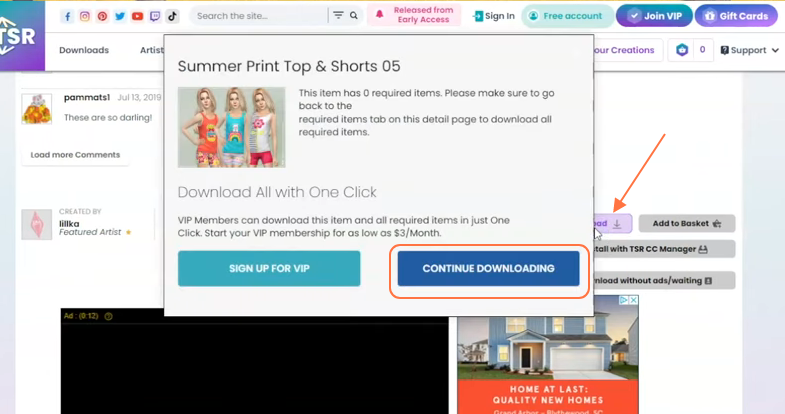
How to Install Sims From “The Sims Resource” (TSR) CC For Sims 4
In this comprehensive guide, we will walk you through the seamless process of installing the Sims using TSR’s website. The Sims Resource (TSR) is an ultimate destination for custom content to provide you an enhanced Sims 4 gameplay experience! It is an online community where Simmers from all corners of the globe come together to…
-

How To Make A Bread
Bread is an edible item in the Minecraft game. Eat it and it will heal your wounds. To make a Bread, you just need Wheat and Crafting Table. Please follow the following steps to make Bread. Wheat In order to make Bread, the basic item that you will need to get is a wheat block.…
-
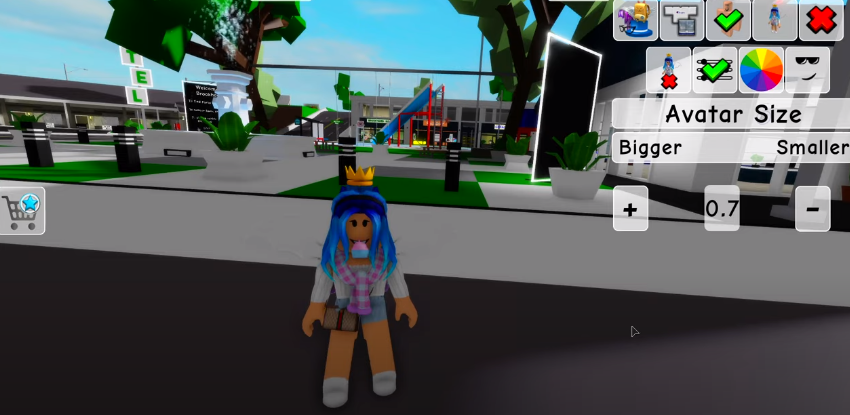
How to Fly In Roblox Brookhaven
If you want to make your character fly in Roblox Brookhaven, you have come to the right place. In this guide, you will learn the method to fly your character in the game. The first thing that you will need to do is to go to the Avatar settings of your character and change the…
-

How to Place Items In House Chest In Hogwarts Legacy
This guide will tell you how to place items in your housechest in Hogwarts Legacy. You will have one of the chests in your little dormitory whatever house you’re in. You need to follow the story until a story Quest, then a side quest will become available to you. You’ll find it in the courtyard.…
-

How to Farm Silk & Wool In LEGO Fortnite
In this guide, you will learn how to farm silk and wool in Lego Fortnite using the easiest method. By following the steps mentioned below, you will be able to grab the required items. You will need to start by raising the level of your camp. When your camp level is high enough, your villagers…
-

Dragon Champions Promo Code 2023 (Updated)
Dragon Champions is an action role playing game that was released in 2019. The characters in the game are divided into different factions including humans, elves and many more. You have to pick the characters to build your dream squad. After building the team, you have to fight against the enemies and their bosses to…
-

How to Add Optifine to Curseforge Modpack
In this guide, you will learn how to add Optifine to Curseforge Modpack. First, you need to check Optfine in Curseforge, if not available then download OptFine and launch it in Minecraft. Check Optfine in Curseforge In this section, we will take you through the steps to check Optfine in Curseforge. First, you have to…
-

Anime Characters That Could Likely Beat The Flash
The Flash is known for being a fast-moving superhero, but what if he had to compete against anime characters in their natural habitat? Take a look at some of the anime characters that could likely beat the Flash.
-

How to Install Perk Up – Better Experience Mod in Starfield
The adaptable Starfield mod “Perk Up – Better Experience” improves your game experience by removing skill challenges, speeding up levelling, and making perk adjustments for a higher quality of life. It provides advantages like boosted carry and freight capacity, prolonged experience gains whilst resting, and more. To install the Perk Up – Better Experience mod…
-

How To Install No Water + Tsunami + Atlantis Mod In GTA 5 ?
The No Water + Tsunami + Atlantis Mod turns the city into a tsunami aftermath or a drought. Atlantis will become a lost city and it opens wide areas for you to explore. For the installation of this program, it required the following programs that needed to be installed in the game. GameConfig OpenIV After…
-

How to Hide Button in Minecraft
In this guide, you will come to know how to hide the button in the Minecraft Pocket Edition. It will let you know about the applications you need to hide the button in the Minecraft PE. There are no buttons in the Minecraft PE, as you can see in the image below. These are the…
-

How to Accept License Agreement on Rocket League (Fix License Agreement)
This guide will show you how to accept the License Agreement on Rocket League (Fix License Agreement). By following the steps below, you will be able to navigate to the settings, go to the Extras tab and read through all the agreements. You will need to go to the Rocket League homepage and click on…
-

Best Ghost Pokémon in HG/SS
Have you been wondering which Pokémon are ghost-type and where to find them? Then you’ll want to have a look at this guide.
-
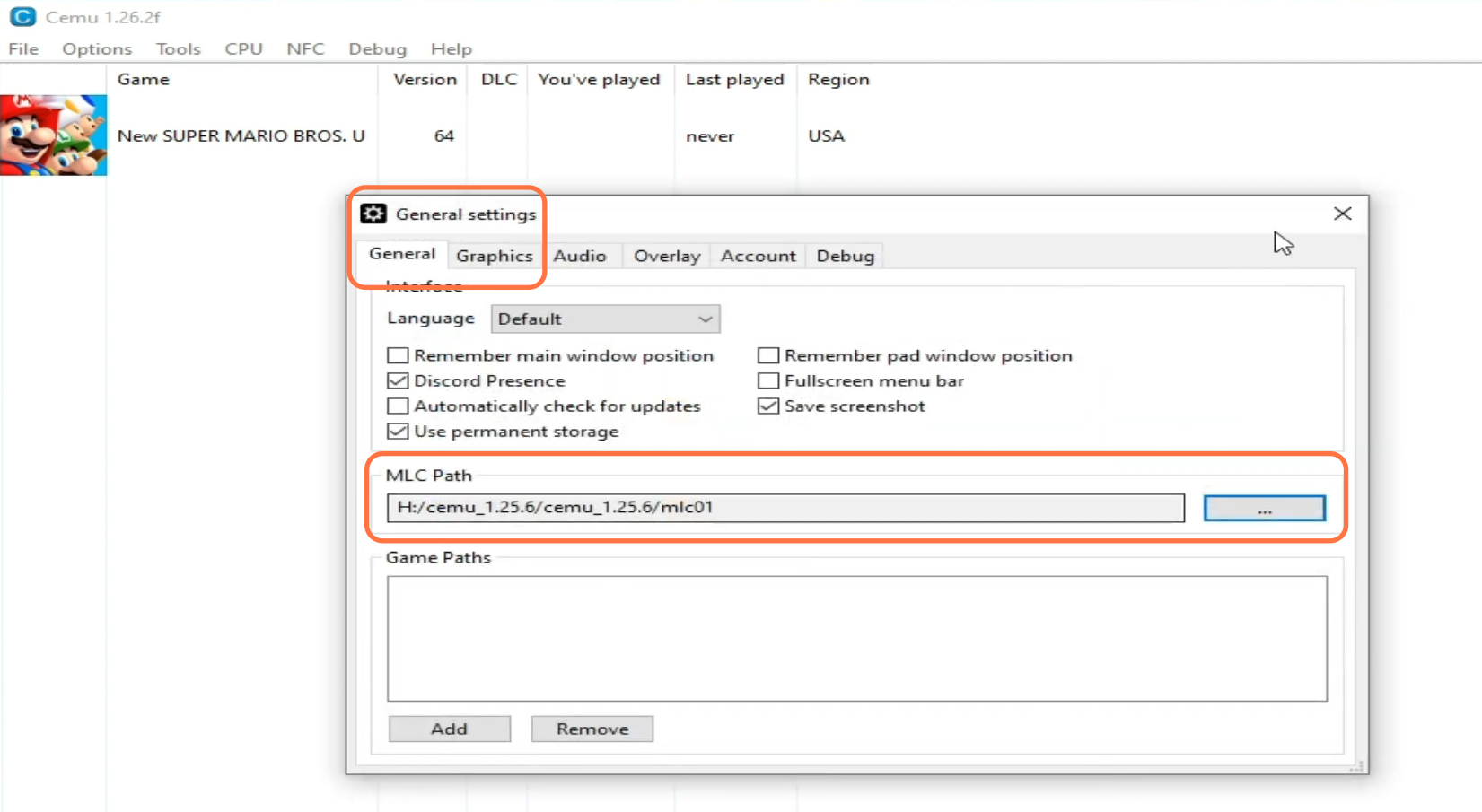
How to Fix Cemu Emulator Crashes on Launching Games
In this guide, you will find how to fix Cemu Emulator crashes on launching games. You have to replace the necessary files correctly and remove the outdated settings and shader cache folders. First, you have to locate the installation location of the Cemu Emulator on your computer and access the “mlc01″ folder within the Cemu…
-

Diablo II: Resurrected – Controls Guide
Diablo 2: Resurrected is a remaster of the original Diablo 2 game with a drop-dead gorgeous visual presentation and a classic feel that Blizzard has brought to the remake. It’s now available for both PC and consoles. In this guide, you’ll find all the Controls to play Game Diablo II: Resurrected. PS4 and PS5 Action…
-

How to Show FPS In CSGO
This guide will let you know how to Show FPS in Counter-Strike: Global Offensive. By following the steps below, you will be able to Enable Developer Console (~) and then input the command in the console to show FPS on the screen. You have to locate the “Escape” (Esc) button on your keyboard and press…
-

How to Change Your Volume in Minecraft
This guide will let you know how to change your volume in Minecraft. 1. First, you need to click on the settings tab from the main menu of Minecraft. 2. Then scroll down to the “Audio” tab and click on it. 3. After that, select the audio type (Weather sounds, Blocks, Hostile Creatures, etc.) you want to…
-

Tips & Tricks For Beginners To Be A Pro Strider in Dawn Of Zombies: Survival
In this brief guide, you will get to know 10 Tips & Tricks For Beginners To Be A Pro Strider in Dawn Of Zombies: Survival game. Unlike other survival games, DOZ has a unique tier system, making DOZ utterly different from other survival games. Tip 1: 5 Tier system Tier 1: 1-31 Tier 2: 32-51…