
Category: Guides
-

Roblox Voxlblade Script
In this guide, you’ll find all the available scripts for the Roblox Voxlblade game along with the procedure of executing the scripts using the Roblox script executor. Additionally, you’ll find out about the perks that you’ll be getting by using these scripts. Voxlblade Voxlblade is a captivating role-playing game on the Roblox platform. In this…
-

How to Survive in the heat in Lego Fortnite
In this guide, you will learn how to survive in heat in Lego Fortnite. You have to follow all the instructions below to do so. Depending on the biome, there will be specific weather conditions that can harm you if you stay in that area for too long. In extreme conditions, you might take damage…
-
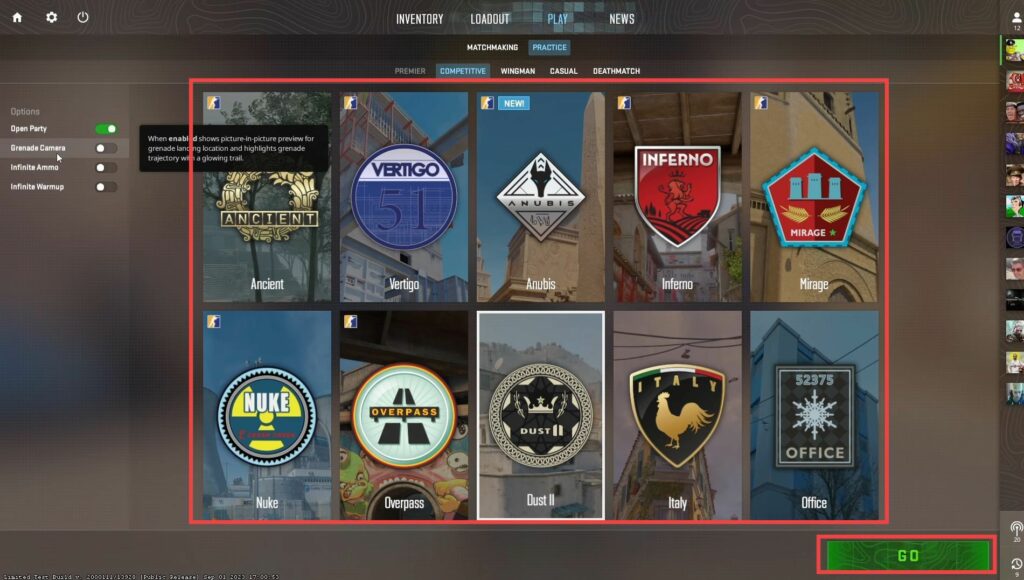
How to Create Private Games in CS2
This guide will let you know how to create your private session in Counter-Strike 2. By following the steps below, you will be able to practice or play with your friends privately. First, you have to click on the Play button and then tap on Practice. After that, select the gameplay that you want to…
-

Best Flying-Type Pokémon in HeartGold & SoulSilver
In the competitive world of Pokémon, it’s important to know the different strengths and weaknesses of each Pokémon, as well as their attacks. Here is an overview of the top flying type Pokémon in Pokémon HeartGold and SoulSilver.
-

Phasmophobia – Controls Guide
With Phasmophobia, you take on the role of a paranormal investigator who must venture into dark and haunted locations in order to gather evidence of the supernatural. In singleplayer mode, you will play as one of four players and work together to solve the mystery. In this guide, you’ll find all the Controls to play…
-

How To Make A Flint And Steel
Flint and Steel can be used to burn ground for a while. It is also used to open the nether portal. To make Flint and Steel, you will need Iron Ore, Flint and Iron ingot using the furnace. Please follow the following steps to make Flint and Steel. Iron Ore In order to make Flint…
-

Cookie Run Kingdom Coupon Code 2023 (Updated)
Cookie Run: Kingdom is an adventure role playing which was released on 21 Jan, 2021 for the game players all around the world. The players have to set their own cookie kingdom. You can team up with cookie friends to find out the resources. You can use these resources to decorate or fix the damaged…
-

How to Fix Fortnite Out of Video Memory Trying to Allocate a Texture Error
This guide will provide you with the most reliable methods to fix Out of video memory trying to allocate a texture error in Fortnite. How to fix this error with Method 1? Step 1: You need to come up to the File Explorer and right-click on This PC. Then click on Properties. Step 2: Next,…
-

Where to Get European Pond Turtle – Assassin’s Creed Valhalla
This guide will let you know where to get the European Pond TURTLE in Assassin’s Creed Valhalla. Go through the guide and follow the steps to get the turtles. This mystery is located on the south of Frankia in Melunois, as shown in the map given below. When you get there, you have to go…
-

How To Fix Steam Failed To Load Steamui
This guide will let you know how to fix the Steam Failed To Load Steamui.dll error. You have to follow the simple instructions to fix it. First, you will need to go to the steam folder in your drive and then right-click on the bin folder. After that, select the delete option to delete it,…
-

How to Change Screen Size in Cinema Mode on PSVR 2 on PS5
This guide will let you know how to adjust the screen size on your PlayStation VR2 headset. You have to go to the Quick settings and you will find an option to change it. Go to Quick settings You can adjust the screen size if you’re playing a non-VR game or on the home screen.…
-

How to Install Portal 2 VR mod
Follow this step-by-step guide to download and install the Portal 2 VR mod for an immersive gaming experience. Step 1: Ensure You Have Portal 2 on Steam First of all, you must own a copy of Portal 2 on Steam. If you haven’t purchased it yet, you’ll need to do so. Step 2: Download the…
-

How to Open Map And Fast Travel in Elden Ring
In this guide, you will learn how to open the maps and fast travel in the Elden Ring. Go through the guide and follow all the instructions carefully to do so. To open the map, you need to press the G key for PC, and if you are using Xbox, you have to press the…
-

My Summer Car: Cheats & Console Commands
Here is a list of My Summer Car cheats and console commands. You can type any of these commands in the graphics menu, and then press Enter to get the desired effect. Seiv This console command will instantly save the game. Weat If you want to change the weather in the game, use this command.…
-
How to Freely Rotate and Move Objects in Sims 4
This guide explains how you can freely rotate and move the objects in Sim 4. You should keep the testing Cheats and Move Objects on for this. The complete guide is given below to resolve this issue. Firstly, you have to get into build mode. To set your camera, go to Menu->Game Options and then…
-

How to Get Different Coloured Toads – Super Mario Run
In this guide, you will come to know how to get different Colored Toads in Super Mario Run. Follow the steps in this guide, and you will be able to get all the toads in the game. If you want to earn different toads, you will need to check the levels you face in Toad…
-

How to Install SSEEdit in Skyrim
In this guide, you will find out how to install SSEEdit in Skyrim. You have to follow the step-by-step instructions to do so. 1. First, you need to download the SSEEdit mod from “https://www.nexusmods.com/skyrimspecialedition/mods/164?tab=files“. Click on the Files tab and then press the Manual Download button to get it for free. 2. Now open the downloads…
-

How to SEE ALL Bought Games or DLC in the Playstation Store on PS5
This guide will let you know how to see all bought games or DLC in the PlayStation Store on PS5. First, you have to access the Transaction History in the settings and then you will be able to view all the purchased games on PS5. Navigate to “Transaction History In this section, we will take…
-
Highest Damage Swords Comparison – Terraria
This guide will provide you with comparisons of all the swords in Terraria. You will find out which is the most damaging sword in the game to counter the enemies. Clubberfish gives 24 damage, while Slap Hand provides 35 damage to the opponents. Swords Damage Comparison Enchanted Sword 24 You can find it in…
-

How to Install No Engine Power Limits Mod in Starfield
The ground-breaking hack “No Engine Power Limits” eliminates engine power limitations, enabling you to power up your engine. By installing this mod, you can personalise the power of your ship to your heart’s desire. To install the No Engine Power Limits mod in Starfield, follow these simple steps: First, download the No Engine Power Limits…