
Category: Guides
-
All Bosses Health Comparison – Terraria 1.4
This guide provides a health comparison of all bosses in Terraria. It shows which boss has the highest health in the game. Name Health Brain of Cthulhu 1,700 King Slime 2,800 Eye of Cthulhu 3,640 Queen Bee 4,760 Dreadnautilus 7,000 Dark Mage 8,000 Skeletron 10,360 Eater of Worlds 10,479 Wall of Flesh 11,200 The Destroyer…
-

Beginner Tips You SHOULD Know – Guardians of the Galaxy
This guide will provide you with the 5 Beginner Tips for the Guardian of the Galaxy game. You can use these tips to make progress in the game. You save or spend your money units in the game; it doesn’t matter because you will always have enough money. Anything you buy in the game will…
-

How to Fix EmuELEC Installation Error(Failed to Mount Core…)
This guide will show you how to fix EmuELEC Installation Error (Failed to Mount Core…).You will need to ensure that your SD card has enough space and that it is working correctly, which means it is not corrupted. You have to open the EMu on your PC in your C drive, then copy the slowemmc.dtb…
-

Sims 4 Cheat Codes
Sims 4 has been out for some time now and the game has certainly stood the test of time. The vast number of customization options certainly add to the replayability of the game and that is why it continues to be a hit among the franchise’s most loyal fans. Additionally, the game continues to receive well deserved love…
-

How to Install Mod in Fnf Psych Engine
This guide will let you know how to install any mod in FNF PSYCH ENGINE. 1. First, you have to download the mod from “https://fridaynightfunking.fandom.com/wiki/Category:Mods_that_run_on_Psych_Engine“. In this case, it is the TeamSeas Mod. Go to the downloads folder and move the file to the desktop. 2. Second, open the downloaded file of Psych Engine, and go…
-

How to do Self Alley Oops in NBA 2K23
This guide will show you how to do a Self Alley-Oops in NBA 2k23. Go through the guide and follow all the instructions carefully to do so. First, you will need to go toward the basket, then press the triangle button twice and hit the Square button. It’s a lot of fun to do, but…
-

Roblox Pop it Simulator Codes 2023 (Updated)
Pop it Simulator is a very popular game on the Roblox platform. You will need to click away to pop your Pop It to gain pops. You can upgrade to a rainbow by collecting 5 of the same Pop It. You can sell your pops to gain coins and upgrade your tool and backpack. Upgrade…
-

OSRS Fremennik Isles – RuneScape Guide
The Fremennik Isles is a quest about the two Fremennik islands Jatizso and Neitiznot who are under the threat of ice trolls. Rewards for Completing the Quest: 5,000 construction XP. 5,000 crafting XP. 10,000 woodcutting XP. 1 Quest point. 10,000 XP in two combat skills. Fremennik royal helm. Access to a reunite vein. Quest: Talk to Mord Gunnars at the deck. He will tell…
-
How to Play Totally Reliable Delivery Service In Multiplayer?
This guide will provide you the method to play Totally Reliable Delivery Service in multiplayer. Go through the guide and follow the instructions to play the game with your friends. You will have to open the game and click on Online. Make a new account if you don’t have one. To add a new friend,…
-

How to Increase Saturation in Valorant on Laptops
In this guide, you will find out how to increase Saturation in Valorant on laptops. To increase Saturation in Valorant, you have to download a software called Color goggles from the following link: https://dan.salvagni.io/s/color-goggles/. After downloading the zip file, you have to extract it. Then go into the folder, and you will find three files.…
-

21 IKEA House Furniture Design Ideas – Minecraft
This guide will provide you with 21 IKEA-style house furniture design ideas for Minecraft. Simple Closet Design This is a classic and simple closet design. You can also make it more functional by storing different items inside and experimenting with hangers, storage ideas, or even hidden spaces. Lamp Design This is a simple way to…
-
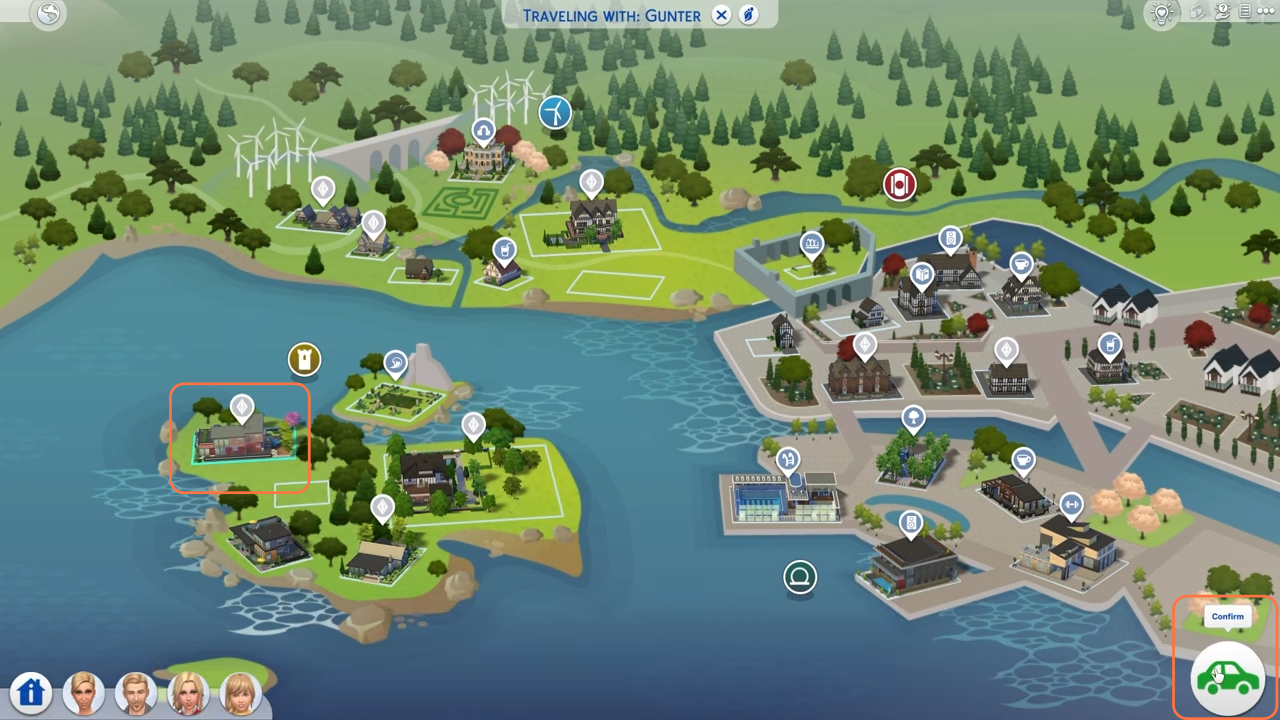
How to Knock On The Door And Visit Other Sims House – The Sims 4
In this brief guide, I will walk you through the process of knocking on doors and visiting other Sim’s houses in The Sims 4. These steps will help you explore new homes, interact with other Sims, and enjoy various activities within their households. Step 1: To initiate your visit, start by pressing the “M” key…
-

How to Equip The Dark Arts Cosmetic Pack in Hogwarts Legacy
This guide will let you know how to equip The Dark Arts Cosmetic Pack in Hogwarts Legacy. 1- First, press options and go over to gear in the upper left. You can equip the Dark Art set now, but first, you need to have an item selected. For this, go to headwear, and you will…
-
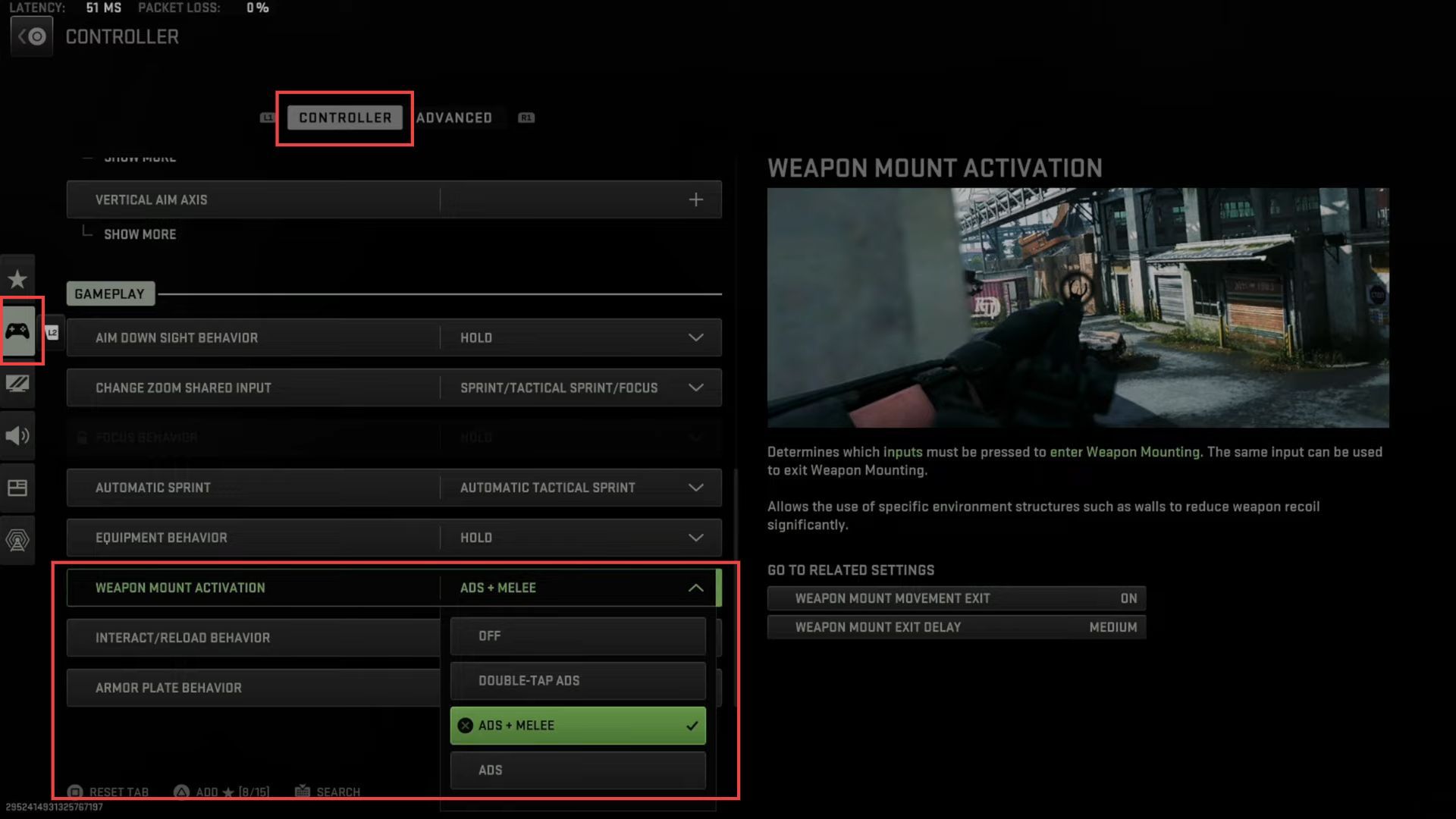
How to TURN OFF or ON Weapon Mount Activation in Call of Duty Warzone 2 & MW2
In this guide, you will find how to turn off or on weapon mount activation in Call of Duty, Warzone 2, and MW2. Open the game menu and navigate to the Settings option. Inside the settings menu, look for and select the Controller option. If you’re using a keyboard and mouse, navigate to the Keyboard…
-

How To Make Cyan Leather Tunic
Cyan Leather Tunic is a type of safety armor that covers and protects the upper body of the player. To make Cyan Leather Tunic, you’ll need Cow or Horse Leather, Leather Tunic, Lapis Lazuli, Cactus, Cactus Green Dye and Cyan Dye. Please follow the following steps to make Cyan Leather Tunic. Cow or Horse Leather …
-

Secret Outfits With Hidden Features In GTA 5 Online
In this guide, you will find out ten SECRET Outfits with HIDDEN features you didn’t know about in GTA 5 Online! All these outfits can be acquired at either a clothing store but one of them has to be acquired at ammunition. Let’s start with the pilot suit. To get this, you have to go…
-

How to Turn Off Fatigue in Madden 23
This guide will tell you how to turn off Fatigue in Madden 23 (XBOX, PlayStation, PC). Go through the guide and follow the simple steps to turn it off. The first thing you will need to do is boot up your game and click on the settings button on the bottom right side of your…
-

How to Install Fuel Mod in GTA 5
In this guide, you will find out how to install the Fuel Mod in your Grand Theft Auto 5 game. 1. The first thing you will need to do is download the Fuel Mod from “https://www.gta5-mods.com/scripts/fuel-script-v-sakis25“. Open the link and click on the green download arrow icon for the current version under the ‘All Versions’…
-
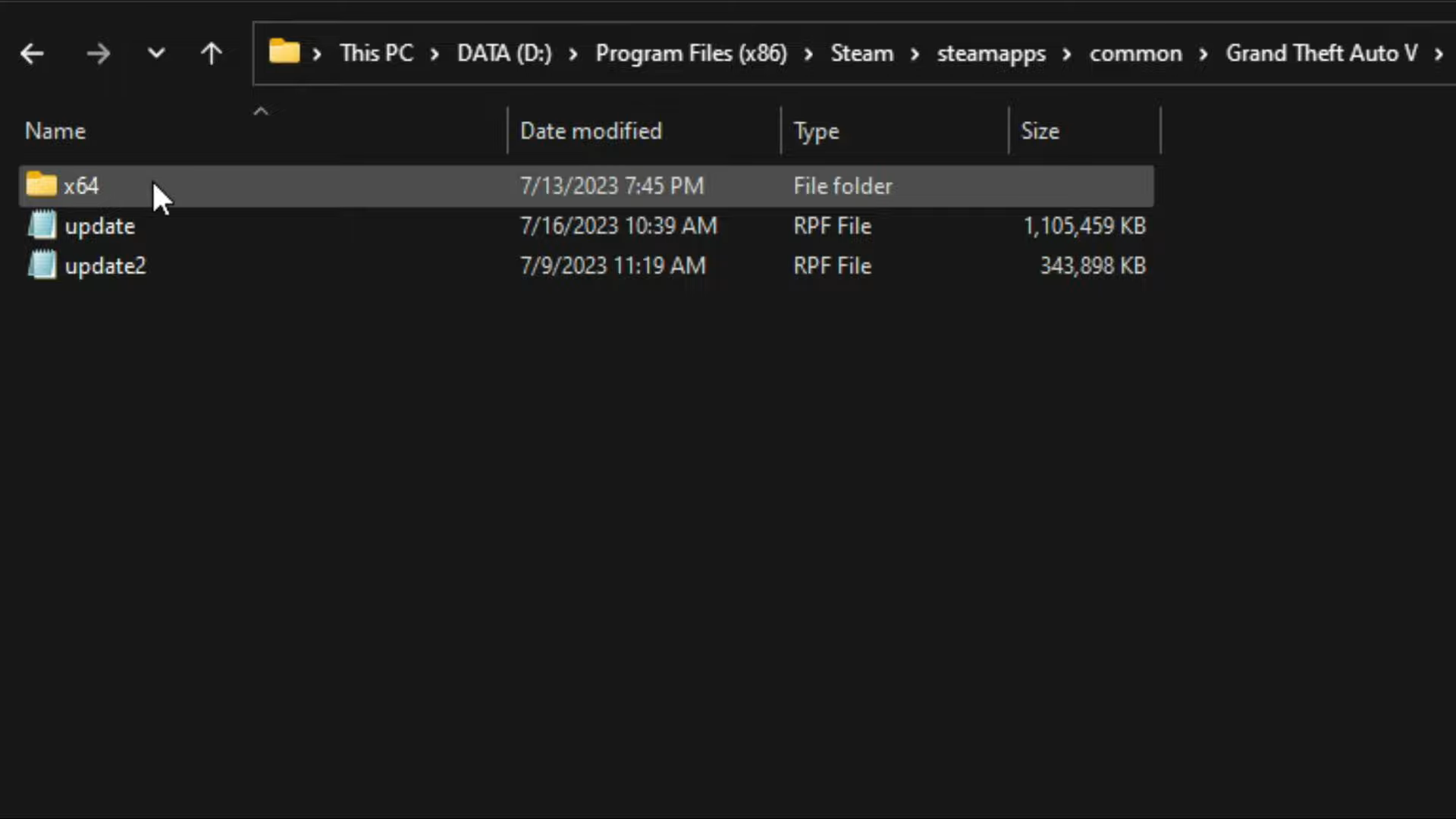
How to install Dlclist Auto Compiler – GTA 5 MODS
In this guide, we’ll introduce you to an essential mod: the Dlclist Auto Compiler. By following these step-by-step instructions, you’ll effortlessly install this mod and unlock access to an exciting new tool within the game. Step 1: Download the Mod The first step is to download the ‘Dlclist Auto Compiler’ mod from a trusted source…
-

Best Minecraft Nike-Themed Skins to Try Out
Millions of people are playing Minecraft and some of them are wandering around to find the skins to customize their experience. This guide will provide you with the Best Minecraft Nike-Themed Skins to try out. Nike Roadman This exciting skin features a sleek black-and-white design, perfect for representing your favorite brand in the world of…